finitedepth#
Package for image analysis of finite depth dip coating.
To analyze with command line, specify the parameters in configuration file(s) and run:
finitedepth analyze <file1> [<file2> ...]
Submodules#
Package Contents#
Classes#
Basic implementation of coating layer without any analysis. |
|
Abstract base class for coating layer object. |
|
Coating layer over rectangular substrate. |
|
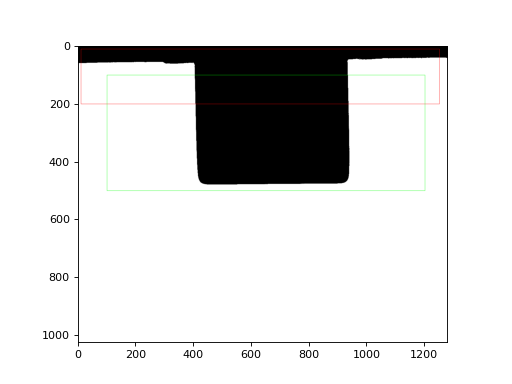
Reference image with ROIs specified. |
|
Abstract base class for reference object. |
|
Abstract base class for substrate whose cross section is a simple polygon. |
|
Substrate having rectangular cross section. |
|
Basic implementation of substrate without any geometric specification. |
|
Abstract base class for substrate object. |
Functions#
|
Get path to sample file. |
|
Perform analysis from configuration files. |
- class finitedepth.CoatingLayer(image, substrate, *, tempmatch=None)[source]#
Bases:
CoatingLayerBase[finitedepth.substrate.SubstrateBase,CoatingLayerData]Basic implementation of coating layer without any analysis.
- Parameters:
Examples
Construct substrate instance first.
>>> import cv2
>>> from finitedepth import get_sample_path, Reference, Substrate
>>> img = cv2.imread(get_sample_path("ref.png"), cv2.IMREAD_GRAYSCALE)
>>> _, bin = cv2.threshold(img, 0, 255, cv2.THRESH_BINARY | cv2.THRESH_OTSU)
>>> ref = Reference(bin, (10, 10, 1250, 200), (100, 100, 1200, 500))
>>> subst = Substrate(ref)
>>> import matplotlib.pyplot as plt
>>> plt.imshow(subst.draw())
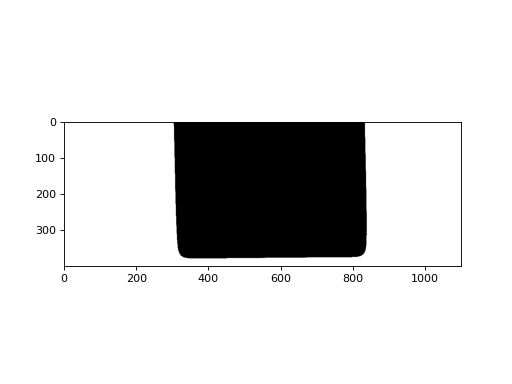
Then, construct coating layer instance.
>>> from finitedepth import CoatingLayer
>>> img = cv2.imread(get_sample_path("coat.png"), cv2.IMREAD_GRAYSCALE)
>>> _, bin = cv2.threshold(img, 0, 255, cv2.THRESH_BINARY | cv2.THRESH_OTSU)
>>> coat = CoatingLayer(bin, subst)
>>> plt.imshow(coat.draw())
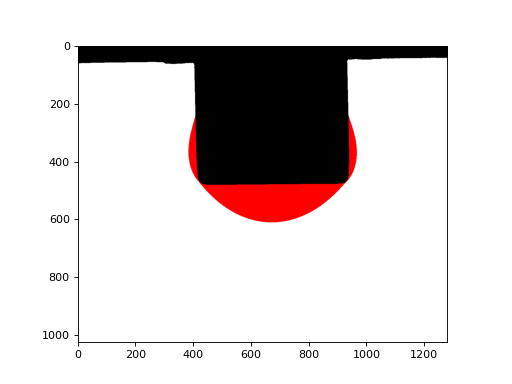
- DataType#
Return
CoatingLayerData.
- draw(subtraction_mode='none', layer_color=(255, 0, 0), layer_thickness=-1)[source]#
Subtract the template match result and paint the coating layer.
- Parameters:
subtraction_mode ({‘none’, ‘template’, ‘substrate’, ‘full’}) – Subtraction mode. ‘template’ and ‘substrate’ removes overlapping template region and substrate region, respectively. ‘full’ removes both.
layer_color (tuple[int, int, int]) – Layer color for
cv2.drawContours().layer_thickness (int) – Layer thickness for
cv2.drawContours().
- Return type:
numpy.typing.NDArray[numpy.uint8]
- class finitedepth.CoatingLayerBase(image, substrate, *, tempmatch=None)[source]#
Bases:
abc.ABC,Generic[SubstTypeVar,DataTypeVar]Abstract base class for coating layer object.
Coating layer object stores
SubstrateBaseobject and target image, which is a binary image of coated substrate. The role of coating layer object is to acquire coating layer region by template matching and analyze its shape.External API can use the following members to get analysis results of concrete subclasses.
- Parameters:
image (numpy.typing.NDArray[numpy.uint8]) – Binary target image.
substrate (SubstTypeVar) – Substrate instance storing binary reference image.
tempmatch (tuple[tuple[int, Ellipsis], float] | None) – Pre-computed template matching result. External constructor can pass this argument to force the template matching result. If not passed,
match_template()performs matching.
- property image: numpy.typing.NDArray[numpy.uint8]#
Binary target image.
For immutability, this image is not writable.
- Return type:
numpy.typing.NDArray[numpy.uint8]
- property substrate: SubstTypeVar#
Substrate instance which contains substrate and reference information.
- Return type:
SubstTypeVar
- DataType: type[DataTypeVar]#
Return type of
analyze.Concrete subclass must assign this attribute with dataclass type.
- match_template(image, template)[source]#
Perform template matching between image and template.
Template matching is performed using
cv2.matchTemplate()withcv2.TM_SQDIFF_NORMED. Subclass may override this method to apply other algorithm.
- substrate_point()[source]#
Upper left point of the substrate image in target image.
- Returns:
Coordinates in
(x, y).- Return type:
numpy.typing.NDArray[numpy.int32]
- coated_substrate()[source]#
Coated substrate region.
- Returns:
Target image without artifacts, e.g., bath surface.
- Return type:
numpy.typing.NDArray[numpy.bool_]
- extract_layer()[source]#
Coating layer region extracted from target image.
- Return type:
numpy.typing.NDArray[numpy.bool_]
- abstract valid()[source]#
Return if the analysis can be performed as expected.
Sometimes, the coating layer instance should be constructed but not analyzed at all. For example, the coating video may contains frames where the capillary bridge is not ruptured yet. This method allows analyzer to skip such instances.
- Return type:
- class finitedepth.RectLayerShape(image, substrate, opening_ksize, reconstruct_radius, roughness_measure, ifd_gsize=None, *, tempmatch=None)[source]#
Bases:
CoatingLayerBase[finitedepth.substrate.RectSubstrate,RectLayerShapeData]Coating layer over rectangular substrate.
- Parameters:
image (numpy.typing.NDArray[numpy.uint8]) – Binary target image.
substrate (finitedepth.substrate.RectSubstrate) – Substrate instance.
opening_ksize (tuple[int, int]) – Kernel size for morphological operation. Elements must be zero or odd number.
reconstruct_radius (int) – Radius of the “safe zone” for noise removal. Imaginary circles with this radius are drawn on bottom corners of the substrate. Connected components not passing these circles are regarded as image artifacts.
roughness_measure (str) –
Similarity measure to quantify roughness.
- ’DTW’
Dynamice time warping.
- ’SDTW’
Root mean square of dynamic time warping.
- ’IFD’
Approximated integral Fréchet distance. Requires ifd_gsize.
ifd_gsize (float | None) – Grid size to approximate integral Fréchet distance. Ignored if roughness_measure is not ‘IFD’.
tempmatch (tuple[tuple[int, Ellipsis], float] | None) – Pre-computed template matching result.
Examples
Construct substrate instance first.
>>> import cv2
>>> from finitedepth import get_sample_path, Reference, RectSubstrate
>>> img = cv2.imread(get_sample_path("ref.png"), cv2.IMREAD_GRAYSCALE)
>>> _, bin = cv2.threshold(img, 0, 255, cv2.THRESH_BINARY | cv2.THRESH_OTSU)
>>> ref = Reference(bin, (10, 10, 1250, 200), (100, 100, 1200, 500))
>>> subst = RectSubstrate(ref, 3.0, 1.0, 0.01)
>>> import matplotlib.pyplot as plt
>>> plt.imshow(subst.draw())
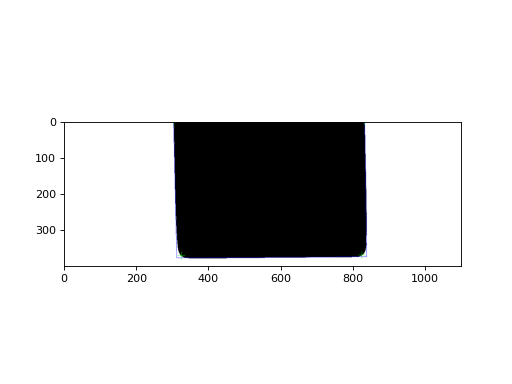
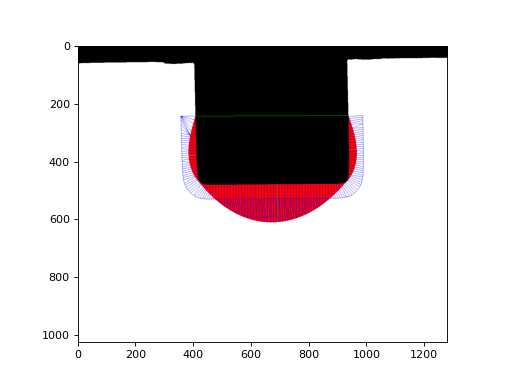
Then, construct coating layer instance.
>>> from finitedepth import RectLayerShape
>>> img = cv2.imread(get_sample_path("coat.png"), cv2.IMREAD_GRAYSCALE)
>>> _, bin = cv2.threshold(img, 0, 255, cv2.THRESH_BINARY | cv2.THRESH_OTSU)
>>> coat = RectLayerShape(bin, subst, (1, 1), 50, "IFD", 3)
>>> plt.imshow(
...     coat.draw(conformality_step=10, roughness_step=5)
... )
- property ifd_gsize: float | None#
Grid size to quantify roughness if
roughness_measureis IFD.- Return type:
float | None
- DataType#
Return
RectLayerShapeData.
- valid#
- layer_contours()[source]#
Find contours of coating layer region.
This method finds external contours of
extract_layer(). Each contour encloses each discrete region of coating layer.- Return type:
tuple[numpy.typing.NDArray[numpy.int32], Ellipsis]
- interfaces()[source]#
Find solid-liquid interfaces.
A substrate can have contact with multiple discrete coating layer regions, and a single coating layer region can have multiple contacts to the substrate. This method returns indices for
contour()where solid-liquid interfaces start and stop.- Returns:
tuple of arrays.
i-th array representsi-th coating layer region inlayer_contours(). Shape of the array is(N, 2), whereNis the number of contacts the coating layer region makes. Each column represents starting and ending indices for the interface interval in substrate contour.- Return type:
tuple[numpy.typing.NDArray[numpy.int64], Ellipsis]
- contour()[source]#
Contour of the entire coated substrate.
- Return type:
numpy.typing.NDArray[numpy.int32]
- capbridge_broken()[source]#
Check if capillary bridge is ruptured.
As substrate is withdrawn from fluid bath, capillary bridge forms between the coating layer and bulk fluid and then ruptures.
- Return type:
- extract_layer()[source]#
Coating layer region extracted from target image.
Error pixels are removed by performing morphological operation and removing the disconnected components that are far from the substrate.
- Return type:
numpy.typing.NDArray[numpy.bool_]
- surface()[source]#
Liquid-gas interface of the coating layer.
Substrate surface exposed to air is considered to be covered by coating layer with zero thickness.
- Returns:
Starting and ending indices for the surface interval in coated substrate contour.
- Return type:
tuple[numpy.int64, numpy.int64]
Note
To acquire the surface points, slice
contour()with the indices.
- uniform_layer()[source]#
Imaginary uniform layer.
Uniform layer is a parallel curve [1] of substrate surface which has the same cross-sectional area as the actual coating layer.
- Returns:
Thickness and polyline vertices of the uniform layer.
- Return type:
tuple[numpy.float64, numpy.typing.NDArray[numpy.float64]]
- max_thickness()[source]#
Regional maximum thicknesses.
Coating layer is segmented using
RectSubstrate.sideline_intersections(). Points on layer surface and sideline for maximum distance in each region are found.- Returns:
tuple of two arrays. The first array contains maximum thickness values on left, bottom, and right region. Value of
0indicates no coating layer on that region. The second array contains points on layer surface and substrate lines for the maximum thickness. Shape of the array is(3, 2, 2); 1st axis indicates left, bottom and right region, 2nd axis indicates layer surface and substrate line, and 3rd axis indicates(x, y)coordinates.- Return type:
tuple[numpy.typing.NDArray[numpy.float64], numpy.typing.NDArray[numpy.float64]]
- draw(background_mode='image', subtraction_mode='none', layer_color=(255, 0, 0), layer_thickness=-1, contactline_color=(0, 255, 0), contactline_thickness=1, maxthickness_color=(0, 255, 0), maxthickness_thickness=1, uniformlayer_color=(0, 0, 255), uniformlayer_thickness=1, conformality_color=(0, 0, 255), conformality_thickness=1, conformality_step=1, roughness_color=(0, 0, 255), roughness_thickness=1, roughness_step=1)[source]#
Visualize the analysis result.
Draw the substrate with by
PaintMode.Display the template matching result with
SubtractionMode.Draw coating layer and contact line.
If capillary bridge is broken, draw regional maximum thicknesses, uniform layer, conformality pairs and roughness pairs.
- Parameters:
background_mode ({‘image’, ‘empty’}) – Determine how background is drawn. ‘image’ draws original background image while ‘empty’ draws on empty frame.
subtraction_mode ({‘none’, ‘template’, ‘substrate’, ‘full’}) – Subtraction mode. ‘template’ and ‘substrate’ removes overlapping template region and substrate region, respectively. ‘full’ removes both.
layer_color (tuple[int, int, int]) – Layer contour’s color for
cv2.drawContours().layer_thickness (int) – Layer contour’s thickness for
cv2.drawContours().contactline_color (tuple[int, int, int]) – Contact line’s color for
cv2.line().contactline_thickness (int) – Contact line’s thickness for
cv2.line().maxthickness_color (tuple[int, int, int]) – Regional maximum thickness line’s color for
cv2.polylines().maxthickness_thickness (int) – Regional maximum thickness line’s thickness for
cv2.polylines().uniformlayer_color (tuple[int, int, int]) – Imaginary uniform layer’s color for
cv2.polylines().uniformlayer_thickness (int) – Imaginary uniform layer’s thickness for
cv2.polylines().conformality_color (tuple[int, int, int]) – Conformality pairs’ color for
cv2.polylines().conformality_thickness (int) – Conformality pairs’ thickness for
cv2.polylines().conformality_step (int) – Step size to skip conformality pairs.
roughness_color (tuple[int, int, int]) – Roughness pairs’ color for
cv2.polylines().roughness_thickness (int) – Roughness pairs’ thickness for
cv2.polylines().roughness_step (int) – Step size to skip roughness pairs.
- Return type:
numpy.typing.NDArray[numpy.uint8]
- class finitedepth.Reference(image, templateROI=(0, 0, None, None), substrateROI=(0, 0, None, None))[source]#
Bases:
ReferenceBase[ReferenceData]Reference image with ROIs specified.
- Parameters:
image (numpy.typing.NDArray[numpy.uint8]) – Binary reference image.
templateROI (DynamicROI) – ROI for template image.
substrateROI (DynamicROI) – ROI for substrate image.
Examples
>>> import cv2
>>> from finitedepth import get_sample_path, Reference
>>> img = cv2.imread(get_sample_path("ref.png"), cv2.IMREAD_GRAYSCALE)
>>> _, bin = cv2.threshold(img, 0, 255, cv2.THRESH_BINARY | cv2.THRESH_OTSU)
>>> ref = Reference(bin, (10, 10, 1250, 200), (100, 100, 1200, 500))
>>> import matplotlib.pyplot as plt
>>> plt.imshow(ref.draw())
- property templateROI: StaticROI#
ROI for template image.
- Return type:
StaticROI
- property substrateROI: StaticROI#
ROI for substrate image.
- Return type:
StaticROI
- DataType#
Return
ReferenceData.
- class finitedepth.ReferenceBase(image)[source]#
Bases:
abc.ABC,Generic[DataTypeVar]Abstract base class for reference object.
Reference object stores reference image, which is a binary image of uncoated substrate. It also contains ROIs for template region and substrate region in the reference image.
External API can use the following members to get analysis results of concrete subclasses.
- Parameters:
image (numpy.typing.NDArray[numpy.uint8]) – Binary reference image.
- property image: numpy.typing.NDArray[numpy.uint8]#
Binary reference image.
For immutability, this image is not writable.
- Return type:
numpy.typing.NDArray[numpy.uint8]
- abstract property templateROI: StaticROI#
ROI for template image.
- Return type:
StaticROI
- abstract property substrateROI: StaticROI#
ROI for substrate image.
- Return type:
StaticROI
- DataType: type[DataTypeVar]#
Return type of
analyze.Concrete subclass must assign this attribute with dataclass type.
- abstract analyze()[source]#
Return analysis result as dataclass.
Return type must be
DataType.- Return type:
DataTypeVar
- draw(templateColor=(255, 0, 0), templateThickness=1, substrateColor=(0, 255, 0), substrateThickness=1)[source]#
Return visualization result in RGB format.
- Parameters:
templateColor (tuple[int, int, int]) – Template ROI box color for
cv2.rectangle().templateThickness (int) – Template ROI box line width for
cv2.rectangle().substrateColor (tuple[int, int, int]) – Substrate ROI box color for
cv2.rectangle().substrateThickness (int) – Substrate ROI box line width for
cv2.rectangle().
- Return type:
numpy.typing.NDArray[numpy.uint8]
- class finitedepth.PolySubstrateBase(reference)[source]#
Bases:
SubstrateBase[RefTypeVar,DataTypeVar]Abstract base class for substrate whose cross section is a simple polygon.
A simple polygon does not have intersection nor hole [2]. Smooth corners are allowed.
- Parameters:
reference (RefTypeVar) – Reference instance which contains the substrate image.
Note
- Substrate image should not have:
Multiple substrates in one image
Multiple contours (e.g. substrate with holes)
- abstract property sigma: float#
Standard deviation of gaussian filter to smooth the noise in contour.
- Return type:
- abstract property hough_parameters: tuple[float, float, int]#
Parameters for Hough line transformation.
- region_points()[source]#
Return an upper center point of the substrate image.
Substrate ROI in reference image must be selected so that this point falls into substrate region.
- Return type:
numpy.typing.NDArray[numpy.int32]
- vertices()[source]#
Find
n()vertices of the polygon.A vertex is a point where two sides of a polygon meet [3]. When the sides are curves, the vertices are defined as local extrema of curvature [4].
The vertices are found by smoothing
contour()withsigmaand finding the local extrema of curvature [5].- Returns:
Indices of the vertex points in
contour().- Return type:
numpy.typing.NDArray[numpy.int32]
- sides()[source]#
Find
n()sides of the polygon.The sides are found by slicing
contour()byvertices().- Returns:
Tuple of array containing points on each side of the polygon contour. The arrays are sorted so that the side containing the first point of the contour comes first.
- Return type:
tuple[numpy.typing.NDArray[numpy.int32], Ellipsis]
Note
Sides can be noisy and curved. Use
sidelines()to get linear models.The term “side” is used instead of “edge” to avoid confusion from other image processing methods (e.g. Canny edge detection).
- sidelines()[source]#
Find
n()sidelines of the polygon.Sideline is the line that contains one side of the polygon [6]. The sidelines are found by performing Hough line transformation on
sides()withhough_parameters.- Returns:
Vector of line parameters in \((\rho, \theta)\). \(\rho\) is the distance from the coordinate origin. \(\theta\) is the angle of normal vector from the origin to the line.
- Return type:
numpy.typing.NDArray[numpy.float32]
Note
Range of angle is \(\theta \in (-\frac{3 \pi}{2}, \frac{\pi}{2}]\). Arctangent direction can be acquired by \(\theta + \frac{\pi}{2}\).
- sideline_intersections()[source]#
Find intersections of
sidelines().- Return type:
numpy.typing.NDArray[numpy.float32]
- class finitedepth.RectSubstrate(reference, sigma, rho_thres, theta_thres, hough_step=1)[source]#
Bases:
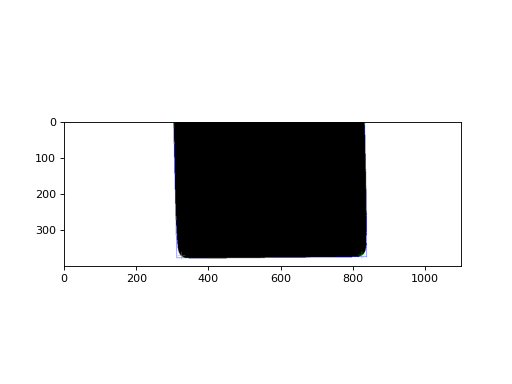
PolySubstrateBase[finitedepth.reference.ReferenceBase,RectSubstData]Substrate having rectangular cross section.
- Parameters:
reference (finitedepth.reference.ReferenceBase) – Reference instance which contains the substrate image.
sigma (float) – Standard deviation of gaussian filter to smooth the noise in contour.
rho_thres (float) – Hough line transformation parameters.
theta_thres (float) – Hough line transformation parameters.
hough_step (int) – Hough line transformation parameters.
Examples
>>> import cv2
>>> from finitedepth import get_sample_path, Reference, RectSubstrate
>>> img = cv2.imread(get_sample_path("ref.png"), cv2.IMREAD_GRAYSCALE)
>>> _, bin = cv2.threshold(img, 0, 255, cv2.THRESH_BINARY | cv2.THRESH_OTSU)
>>> ref = Reference(bin, (10, 10, 1250, 200), (100, 100, 1200, 500))
>>> subst = RectSubstrate(ref, 3.0, 1.0, 0.01)
>>> import matplotlib.pyplot as plt
>>> plt.imshow(subst.draw())
- property hough_parameters: tuple[float, float, int]#
Hough line transformation parameters passed to the constructor.
- DataType#
Return
RectSubstData.
- draw(mode='image', vertice_color=(0, 255, 0), vertice_thickness=1, vertice_markerSize=20, sideline_color=(0, 0, 255), sideline_thickness=1)[source]#
Draw substrate image and show vertices and sidelines.
- Parameters:
mode ({‘image’, ‘contour’}) – Draw mode. ‘image’ draws
image(), while ‘contour’ drawscontour().vertice_color (tuple[int, int, int]) – Vertice marker color for
cv2.drawMarker().vertice_thickness (int) – Vertice marker thickness for
cv2.drawMarker().vertice_markerSize (int) – Vertice marker size for
cv2.drawMarker().sideline_color (tuple[int, int, int]) – Sideline color for
cv2.line().sideline_thickness (int) – Sideline thickness for
cv2.line().
- Return type:
numpy.typing.NDArray[numpy.uint8]
- class finitedepth.Substrate(reference)[source]#
Bases:
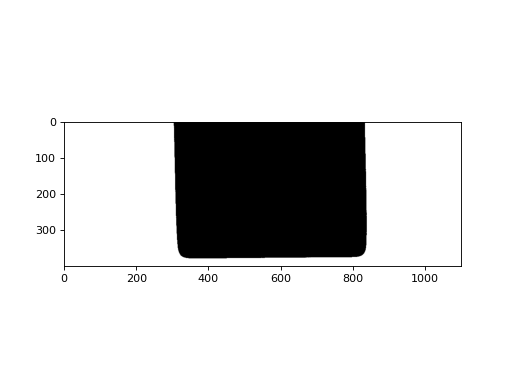
SubstrateBase[finitedepth.reference.ReferenceBase,SubstrateData]Basic implementation of substrate without any geometric specification.
- Parameters:
reference (RefTypeVar) – Reference instance which contains the substrate image.
Examples
>>> import cv2
>>> from finitedepth import get_sample_path, Reference, Substrate
>>> img = cv2.imread(get_sample_path("ref.png"), cv2.IMREAD_GRAYSCALE)
>>> _, bin = cv2.threshold(img, 0, 255, cv2.THRESH_BINARY | cv2.THRESH_OTSU)
>>> ref = Reference(bin, (10, 10, 1250, 200), (100, 100, 1200, 500))
>>> subst = Substrate(ref)
>>> import matplotlib.pyplot as plt
>>> plt.imshow(subst.draw())
- DataType#
Return
SubstrateData.
- class finitedepth.SubstrateBase(reference)[source]#
Bases:
abc.ABC,Generic[RefTypeVar,DataTypeVar]Abstract base class for substrate object.
Substrate object stores substrate image, which is a binary image of bare substrate acquired from
ReferenceBaseobject. The role of substrate object is to analyze the shape of the bare substrate.External API can use the following members to get analysis results of concrete subclasses.
- Parameters:
reference (RefTypeVar) – Reference instance which contains the substrate image.
- property reference: RefTypeVar#
Reference instance which contains the substrate image.
- Return type:
RefTypeVar
- DataType: type[DataTypeVar]#
Return type of
analyze.Concrete subclass must assign this attribute with dataclass type.
- image()[source]#
Substrate image from
reference().- Return type:
numpy.typing.NDArray[numpy.uint8]
- abstract region_points()[source]#
Coordinates of points representing each substrate region.
Substrate image can have multiple disconnected substrate regions. Concrete classes should implement this method to return coordinates of points representing each region.
- Returns:
(N, 2)-shaped array, where N is the number of substrate regions. Column should be the coordinates of points in
(x, y).- Return type:
numpy.typing.NDArray[numpy.int32]
Note
These points are used to distinguish substrate regions from other foreground pixels, and give indices to each region.
As higher-level methods are expected to rely on this method, it is best to keep this method simple and independent.
- regions()[source]#
Labelled image of substrate regions.
Substrate regions are determined as connected component including a point in
region_points().- Returns:
Labelled image. Value of
irepresentsi-th region inregion_points().-1represents background.- Return type:
numpy.typing.NDArray[numpy.int8]
Note
Maximum number of regions is 128.
- contours(region)[source]#
Find contours of a substrate region.
- Parameters:
- Returns:
Tuple of the result of
cv2.findContours().- Return type:
tuple[tuple[numpy.typing.NDArray[numpy.int32], Ellipsis], numpy.typing.NDArray[numpy.int32]]
Note
Contours are dense, i.e., no approximation is made.
- finitedepth.get_sample_path(*paths)[source]#
Get path to sample file.
- Parameters:
paths (str) – Subpaths under
finitedepth/samples/directory.- Returns:
Absolute path to the sample file.
- Return type:
Examples
>>> from finitedepth import get_sample_path
>>> get_sample_path()
'path/finitedepth/samples'
>>> get_sample_path("myfile")
'path/finitedepth/samples/myfile'
- finitedepth.analyze_files(*paths, recursive=False, entries=None)[source]#
Perform analysis from configuration files.
- Supported formats:
YAML
JSON
Each file can have multiple entries. Each entry must have
typefield which specifies the analyzer. For example, the following YAML file containsfooentry which is analyzed byFooanalyzer.foo: type: Foo ...
Analyzers are searched and loaded from entry point group
"finitedepth.analyzers", and must have the following signature:- Parameters:
- Returns:
Whether the analysis is finished without error.
- Return type: