finitedepth.reference#
Manage reference image and ROIs.
Module Contents#
Classes#
Abstract base class for reference object. |
|
Analysis data for |
|
Reference image with ROIs specified. |
Functions#
|
Convert dynamic ROI to static ROI. |
Attributes#
Type variable for |
|
Type annotation for ROI whose upper limits can be dynamically determined. |
|
Type annotation for ROI whose items are all static. |
- finitedepth.reference.DataTypeVar[source]#
Type variable for
ReferenceBase.DataType.
- finitedepth.reference.DynamicROI[source]#
Type annotation for ROI whose upper limits can be dynamically determined.
This is a tuple of
(x0, y0, x1, y1), where items can be integer orNoneby Python’s slicing convention.
- finitedepth.reference.StaticROI[source]#
Type annotation for ROI whose items are all static.
This is a tuple of
(x0, y0, x1, y1), where every item is nonnegativeint.
- finitedepth.reference.sanitize_ROI(roi, h, w)[source]#
Convert dynamic ROI to static ROI.
- Parameters:
- Returns:
Tuple in
(x0, y0, x1, y1). Values are converted to positive integers.- Return type:
StaticROI
- class finitedepth.reference.ReferenceBase(image)[source]#
Bases:
abc.ABC,Generic[DataTypeVar]Abstract base class for reference object.
Reference object stores reference image, which is a binary image of uncoated substrate. It also contains ROIs for template region and substrate region in the reference image.
External API can use the following members to get analysis results of concrete subclasses.
- Parameters:
image (numpy.typing.NDArray[numpy.uint8]) – Binary reference image.
- property image: numpy.typing.NDArray[numpy.uint8][source]#
Binary reference image.
For immutability, this image is not writable.
- Return type:
numpy.typing.NDArray[numpy.uint8]
- DataType: type[DataTypeVar][source]#
Return type of
analyze.Concrete subclass must assign this attribute with dataclass type.
- abstract analyze()[source]#
Return analysis result as dataclass.
Return type must be
DataType.- Return type:
DataTypeVar
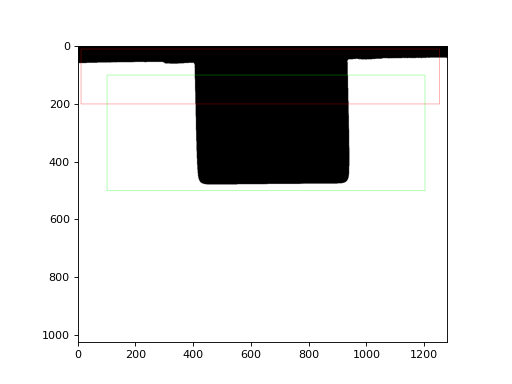
- draw(templateColor=(255, 0, 0), templateThickness=1, substrateColor=(0, 255, 0), substrateThickness=1)[source]#
Return visualization result in RGB format.
- Parameters:
templateColor (tuple[int, int, int]) – Template ROI box color for
cv2.rectangle().templateThickness (int) – Template ROI box line width for
cv2.rectangle().substrateColor (tuple[int, int, int]) – Substrate ROI box color for
cv2.rectangle().substrateThickness (int) – Substrate ROI box line width for
cv2.rectangle().
- Return type:
numpy.typing.NDArray[numpy.uint8]
- class finitedepth.reference.Reference(image, templateROI=(0, 0, None, None), substrateROI=(0, 0, None, None))[source]#
Bases:
ReferenceBase[ReferenceData]Reference image with ROIs specified.
- Parameters:
image (numpy.typing.NDArray[numpy.uint8]) – Binary reference image.
templateROI (DynamicROI) – ROI for template image.
substrateROI (DynamicROI) – ROI for substrate image.
Examples
>>> import cv2
>>> from finitedepth import get_sample_path, Reference
>>> img = cv2.imread(get_sample_path("ref.png"), cv2.IMREAD_GRAYSCALE)
>>> _, bin = cv2.threshold(img, 0, 255, cv2.THRESH_BINARY | cv2.THRESH_OTSU)
>>> ref = Reference(bin, (10, 10, 1250, 200), (100, 100, 1200, 500))
>>> import matplotlib.pyplot as plt
>>> plt.imshow(ref.draw())
- DataType[source]#
Return
ReferenceData.
- analyze()[source]#
Return empty
ReferenceData.